
Product idea
One organised study workspace for notes, files, images, PDFs, and AI learning support.
case.study // lumora
Smart Study Companion
Turning scattered study materials into clear understanding.
Lumora is a mobile-first iOS study companion that helps university students organise notes, PDFs, images, and files, then turn them into AI-assisted summaries and clearer study workflows.
Prototype / In Development · SwiftUI · AI Study Workflow
Nominated for UTS Software Engineering Tech Fest 2026
app.preview
Mobile-first study workspace
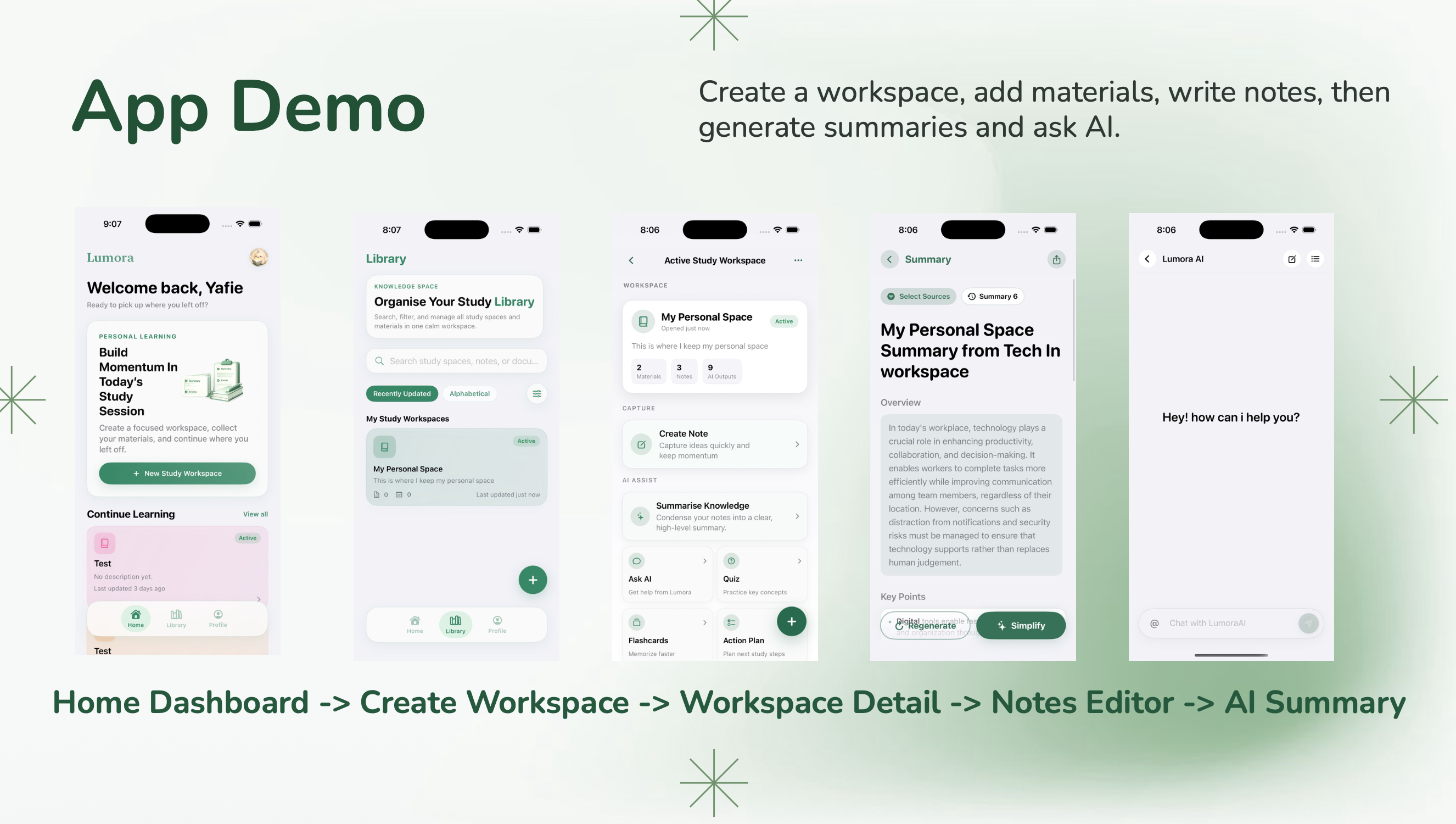
Product snapshot
Core flow
Workspace → Materials → Notes → AI Summary → Review
Technical focus: SwiftUI, MVVM, file/PDF/image handling, reliable state flow, and summary guard checks.
Prototype / In Development
00 // project.summary
A mobile-first study companion combining organised workspaces, notes, file/image/PDF handling, AI-assisted summaries, and review workflows.
One organised study workspace for notes, files, images, PDFs, and AI learning support.
Students often collect study materials across multiple apps but still struggle to identify what matters.
A calm, mobile-first iOS interface inspired by familiar study and notes workflows.
SwiftUI screens, MVVM structure, file handling, summary guard checks, and reliable state flow.
01 // problem.audience
problem.statement
Study materials often sit across notes, PDFs, screenshots, slides, images, and separate apps. Even when students have access to the material, understanding can still feel scattered because the content is not organised, summarised, or connected.
primary.audience
University students aged 18-25 who want one organised place to learn, review, and understand their study materials.
The goal was not only storing materials, but helping students move from collecting information to understanding it.
02 // user.persona
persona
Alex is a university student who relies on digital tools to keep up with lectures and assignments. He collects notes, PDFs, images, and slides from multiple sources but struggles to stay organised and understand the content clearly.
“I have all my notes, but I still don't understand the content.”
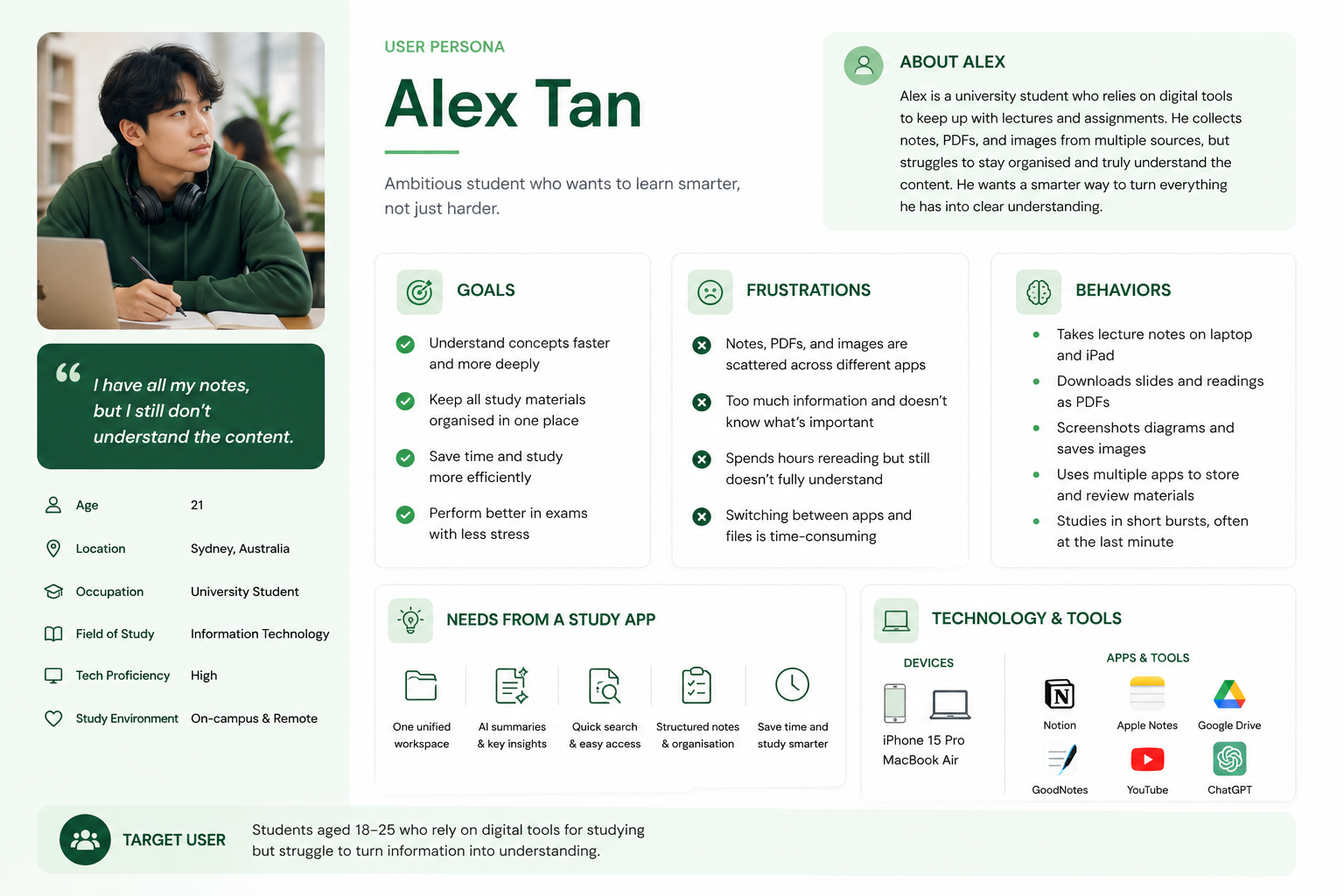
Age
21
Location
Sydney, Australia
Occupation
University Student
Field of Study
Information Technology
Tech Proficiency
High
Study Environment
On-campus & Remote
technology.tools
03 // design.process
Before building the interface, I mapped the core journey from opening the dashboard to creating a workspace, adding materials, writing notes, generating summaries, and reviewing study content.
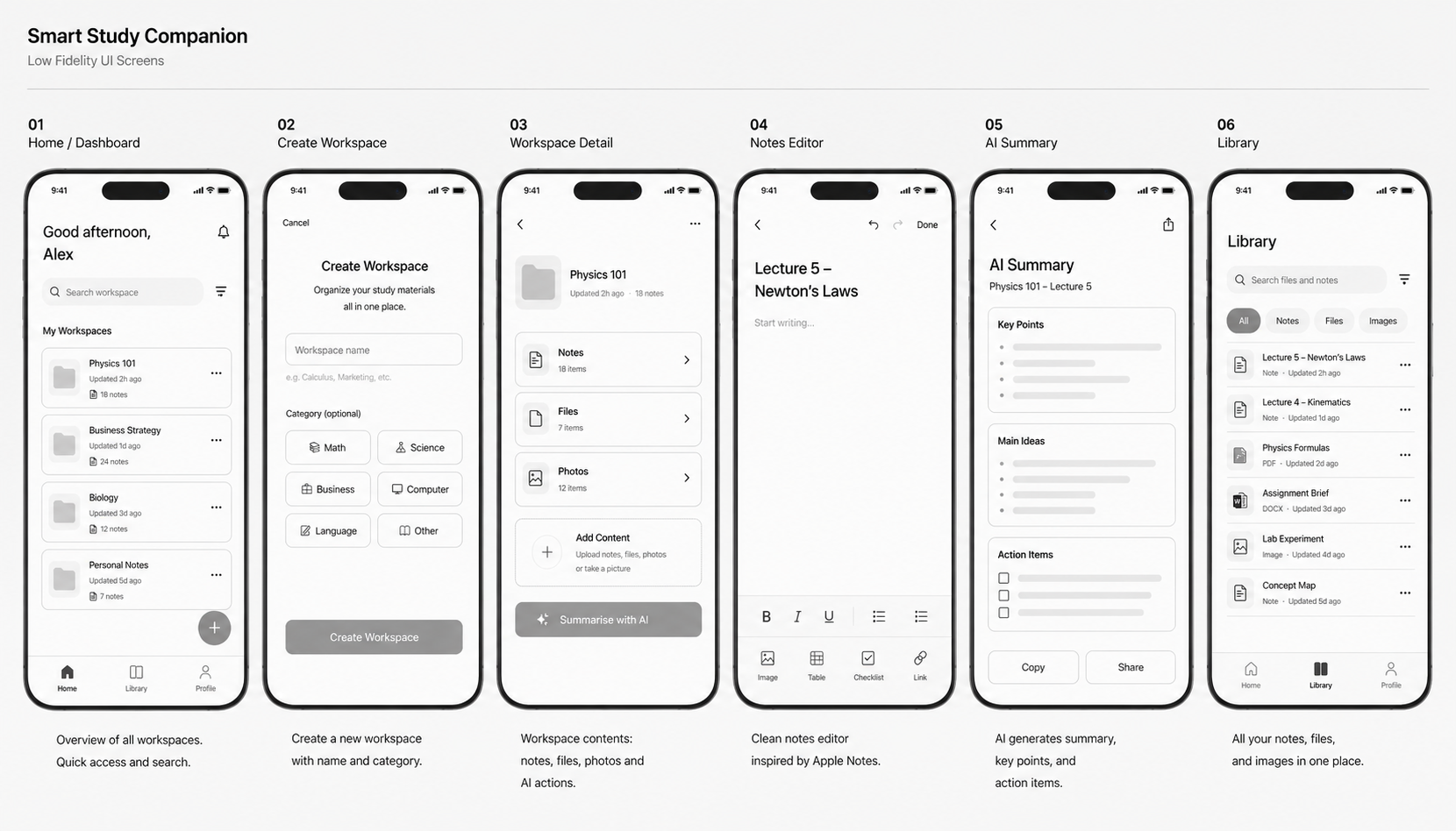
Overview of all workspaces with quick access and search.
Create a new workspace with name and category.
View workspace contents such as notes, files, photos, and AI actions.
Clean note-taking screen inspired by Apple Notes.
AI generates key points, main ideas, and action items.
All notes, files, and images in one place.
04 // app.flow
The app follows a simple loop: organise materials, capture notes, generate summaries, and review understanding.
The student creates a subject or topic space for one focused area of study.
Notes, PDFs, images, and files are collected into the same workspace.
The student records or edits study notes in a clean iOS-style flow.
Lumora summarises real content into key points, main ideas, and action items.
The student reviews the summary or asks follow-up questions from the study context.
05 // tech.stack
The technical focus was a reliable iOS study flow with SwiftUI and MVVM, while preparing backend support for authentication, study data, and AI-assisted summaries.
Implemented in prototype
SwiftUI
Native iOS interface.
MVVM
Separates UI, state, and logic.
Swift state management
Loading, error, and content states.
Implemented / in development
Core Data
Offline study cache.
Local JSON / FileManager storage
Notes, materials, chat, and summary history.
File/image/PDF handling
Imports and previews study materials.
Vision / PDFKit
Extracts study content from images and PDFs.
Planned / in development
NestJS
Backend REST API.
Prisma + PostgreSQL
Database and data models.
JWT Auth
Secure login and session handling.
OpenAI service
Summaries, study chat, and embeddings.
Used during design and development
GitHub
Collaboration and version control.
Figma
Low-fidelity and product design direction.
06 // greatest.challenge
The main challenge was making AI summaries reliable enough to feel useful and trustworthy.
The hardest part was not adding AI; it was preventing empty, unreliable, or misleading summaries when source material was weak.
Problem
Unreadable previews and weak extracted content.
approach
MVVM preprocessing and async import parsing before summary.
result
Summaries use real, readable study material.
Problem
Empty or fallback summaries could appear.
approach
ViewModel guard checks before API summary call.
result
No fake summary output.
Problem
State could desynchronise between workspace and summary views.
approach
SwiftUI state flow with explicit loading and error states.
result
More predictable and trustworthy UX.
Problem
General tools feel fragmented for quick study.
approach
Native SwiftUI screen flow optimised for iOS usage.
result
Faster end-to-end study workflow.
07 // outcome.reflection
A useful study app needs to reduce cognitive load, not just add more features.
The study workflow needed to feel fast and natural on iOS, especially for students studying in short sessions.
AI output should be guarded by real content checks so users do not receive empty or misleading summaries.
Low-fidelity screens helped clarify the core flow before building the SwiftUI MVP.
Lumora helped me connect user research, mobile interface design, SwiftUI implementation, and AI-assisted workflows into one product story. It strengthened how I think about tools that support understanding, not only content storage.
Lumora explores how organised workspaces, native iOS design, and AI-assisted summaries can help students study smarter.